> ## Documentation Index
> Fetch the complete documentation index at: https://langbear.runbear.io/llms.txt
> Use this file to discover all available pages before exploring further.
# Introduction
> Welcome to LangBear, the open-source prompt management platform for LangChain.
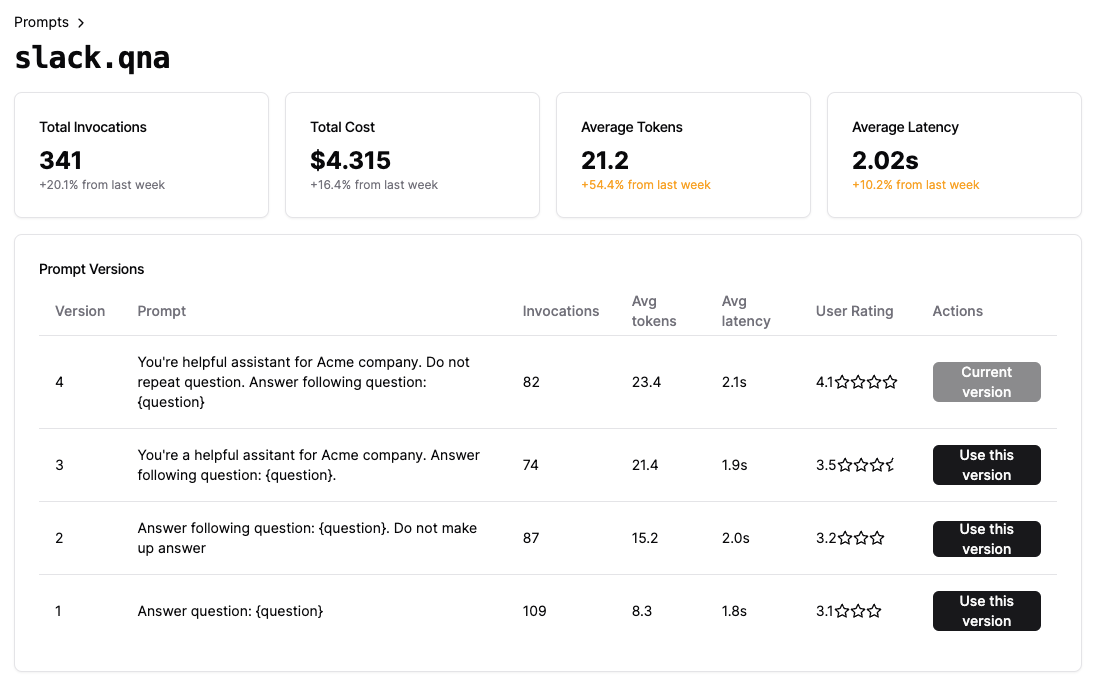 Introducing LangBear, a groundbreaking open-source AI prompt management platform. Designed to
enhance the agility and efficacy of AI applications, LangBear allows for **on-the-fly editing
and deployment of prompts to production**. Beyond the management, it offers an array of
features to elevate prompt quality, including **localization**, **monitoring**, **ratings**,
and **A/B testing** capabilities.
With LangBear, users gain the tools to refine and optimize AI prompts
swiftly and efficiently, empowering continuous improvement in real-world applications.
## Setting up
The first step to improve your prompt quality is setting up your development environnments.
Run your LangBear app locally and jump on to the development
Get your dependencies set up for easy development
Introducing LangBear, a groundbreaking open-source AI prompt management platform. Designed to
enhance the agility and efficacy of AI applications, LangBear allows for **on-the-fly editing
and deployment of prompts to production**. Beyond the management, it offers an array of
features to elevate prompt quality, including **localization**, **monitoring**, **ratings**,
and **A/B testing** capabilities.
With LangBear, users gain the tools to refine and optimize AI prompts
swiftly and efficiently, empowering continuous improvement in real-world applications.
## Setting up
The first step to improve your prompt quality is setting up your development environnments.
Run your LangBear app locally and jump on to the development
Get your dependencies set up for easy development